Think Proctor X - A Proctoring -As-A-Service Platform
Description:
Think Proctor X integrates proctor functionality on top of other test assessment platforms like Moodle, Mettl, Think Exam 8.
Our platform has advanced features such as:
- Multi language support
- Continuity Camera (which checks live presence of candidates and checks whether the candidate has attached a static photo in front of the camera by asking the candidate to look into different parts of the screen).
- Additional Cameras to capture front, side, back view or with custom instructions.
- Super proctor functionality
Dashboard View
Data Cards and Graphical representation of Total Sessions conducted, Number of groups facilitated, Average Credibility Score Achieved, Templates Created, Approval Status of Proctors & Super Proctors, Group-Based Session Analysis, Sessions Conducted Trend and UFM-Wise Violation Count with Date Filtering and View Live Monitoring option.
The Overview data card shows the information based on Auto Proctored template, Live Proctored template or both types of templates combined.
Approval Status: Proctors & Super Proctors
- The graph below displays the number of proctors and super proctors with their pending or approved status.
Super proctors can view a candidate’s screen through active normal proctors. If a normal proctor becomes inactive, the candidate is automatically reassigned to another active normal proctor. The super proctor can then continue monitoring the candidate through the new proctor.
- Once Proctors share their information containing Personal, Address and Professional Details, Administrators need to approve them from the 'Proctor' section.
Group-Based Session Analysis Graph
- Group-Based Session Analysis graph displays the number of sessions based on each group (test), group's suspicious percentage and average credibility score.
- Blue bar shows normal sessions, Red bar shows Negative sessions, orange bar shows suspicious sessions. Line chart on the same graph shows the number of sessions which are suspicious as compared to the total number of sessions (In Percentage).
- Average credibility Score (percentage) shows average credibility score achieved as per total sessions conducted for the particular group name. Credibility Scores are based on unfair acts done by the candidate during examination/assessment. Unfair Violations generally consist of Unfair Means such as Face Mismatch, Face Not Present, Looking Away, Object Detected, Multi Face Detected, Permission Revoked, Screen Focus Lost and Voice Detected
- If a candidate re-enters the test, a different instance is created under the same session.
- Group here means test associated (Group Name is the name of the test).
Sessions Conducted Trend
The graph displays the number of sessions conducted on each day. The time line can be changed to Days, Weeks, Months and Year as per the filter on the top-right side of the graph.
Se
UFM-Wise Violation Count
This graph represents the number of unfair means generated for each type of unfair means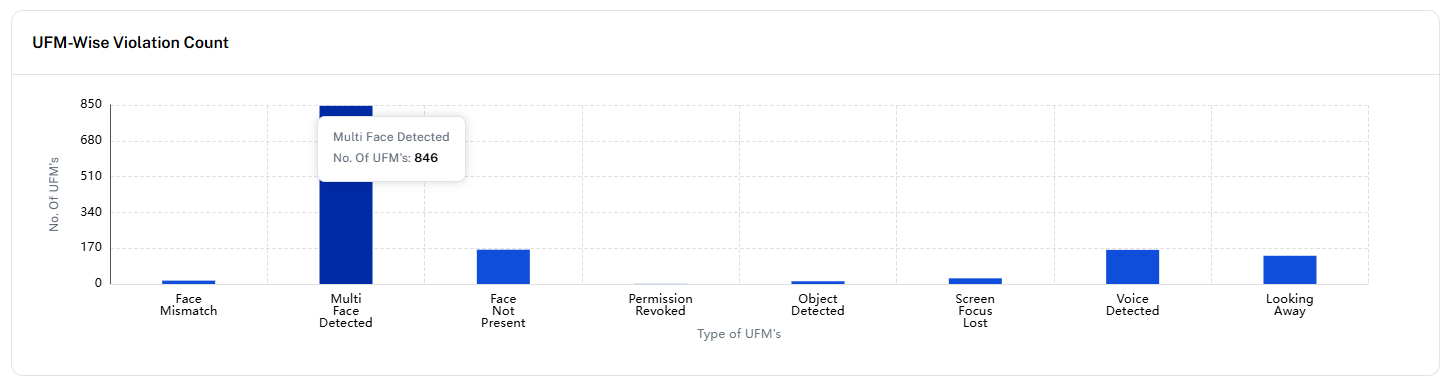
Related Articles
How to create an assessment with Think Proctor X ?
First, create a template using Think Proctor X platform. Refer the article here. Think Proctor X login address is: https://suite.thinkexam.com/login or https://proctoradmin.thinkexam.com After a template is completed, Navigate to Admin portal of ...Integration in Think X
API Integration Track assessment monitoring methods and outcomes API Credentials API Key f891baad-eca6-4127-b191-85a60949b2fd API Secret RWUKc8TCi9tLjUlV3UeoFhoF4QTzMNK2851DpITcgrs= Signature Generation Post This API will be used to generate ...How to filter session reports in Think Proctor X?
Think Proctor X provides robust and dynamic filtering options within the Session Reports module, enabling administrators to efficiently search and analyze candidate session data. To access and apply filters, navigate to: Think Proctor X → Reports → ...How to Integrate Think Proctor X Services with Test engine platforms?
We provide Think Exam version 8 as a test engine which is already integrated with Think Proctor X. To integrate Think Proctor X with any other Test engine platform, kindly refer our API and SDK Documentation. ...How Proctors/ Super Proctors monitor candidates using Think Proctor X? (Proctor Journey As Per Think Proctor X)
The proctors can view live sessions of the candidates currently attempting the exam. This feature is enabled for Live Proctoring templates. Sessions will be shared among multiple proctors through round-robin basis and the proctors which are having ...