How to create an assessment with Think Proctor X ?
First, create a template using Think Proctor X platform. Refer the article here.
Think Proctor X login address is: https://suite.thinkexam.com/login or https://proctoradmin.thinkexam.com
After a template is completed,
Navigate to Admin portal of Think Exam Version 8.
Create a test on Think Exam 8 Test engine platform. Refer the article here.
On step 2(Test Setting) -> Expand the Proctor Settings option-> Select the template you created using Think Proctor X.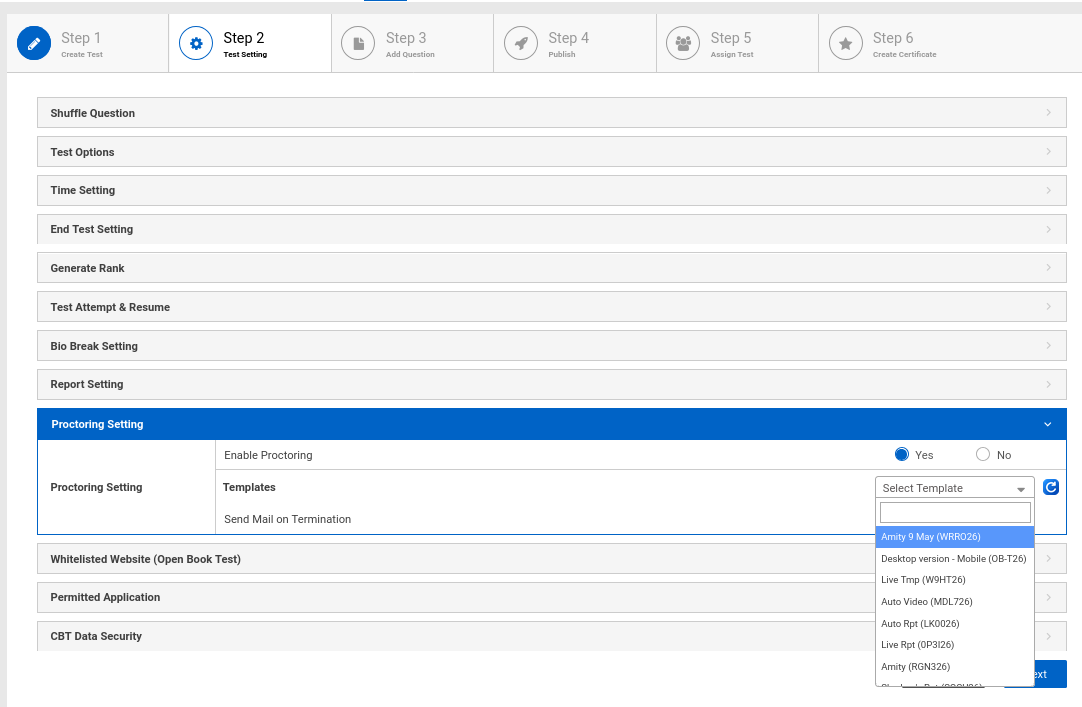
Proceed with all test related configuration and publish (Set status as active) the test.
Related Articles
Integration in Think X
API Integration Track assessment monitoring methods and outcomes API Credentials API Key f891baad-eca6-4127-b191-85a60949b2fd API Secret RWUKc8TCi9tLjUlV3UeoFhoF4QTzMNK2851DpITcgrs= Signature Generation Post This API will be used to generate ...Think Proctor X - A Proctoring -As-A-Service Platform
Description: Think Proctor X integrates proctor functionality on top of other test assessment platforms like Moodle, Mettl, Think Exam 8. Our platform has advanced features such as: Multi language support Continuity Camera (which checks live presence ...How to Attempt a Proctored test using Think Proctor X?
How to Attempt a Proctored test using Think Proctor X? Step 1: Login On the login page, enter your login credentials (ID & Password) which you should have received via email. Step 2: Start Test Click on "Start Test" to begin the system check and ...How to filter session reports in Think Proctor X?
Think Proctor X provides robust and dynamic filtering options within the Session Reports module, enabling administrators to efficiently search and analyze candidate session data. To access and apply filters, navigate to: Think Proctor X → Reports → ...How to view Student Activity Log in Think Proctor X?
Navigate to https://proctoradmin.thinkexam.com/report/session Click on the clock timer button. You can filter the logs by stage of assessment (For example: such as Session, Webcam Check, Mic Check), Actor (Candidate,System,Smart Proctor and Proctor) ...