Think Interview – Dashboard Overview
Total Interviews
Pending Evaluation
The Live Dashboard provides real-time visibility into ongoing interview activities. It enables recruiters and administrators to monitor interviews as they happen, ensuring better coordination and immediate action when required.
Live Interviews
This section displays the total number of interviews currently in progress. It provides a real-time count directly from the system, helping you track active interview sessions at any given moment.
In Lobby
This indicates the number of candidates who have joined the platform and are currently waiting in the lobby for their interview to begin. It helps interviewers stay prepared and manage wait times effectively.
Dropout
This represents candidates who exited the interview process before completion. Monitoring dropouts helps identify potential issues such as technical difficulties, connectivity problems, or candidate disengagement.
In Session
This shows the number of interviews that are actively ongoing. It provides clarity on how many interview panels are currently engaged with candidates in real time.
No Show
This reflects the number of candidates who did not appear for their scheduled interview. It helps recruiters track attendance and take necessary follow-ups or rescheduling actions.
Interview Funnel
- Completed
- Incomplete
- No Show
- Cancelled
Recommendation Panel
- Highly Recommended
- Recommended
- Considered
- Not Recommended
Competency Analysis
- Communication Clarity
- Behavioral Integrity & Stability
- Professional Presence Demeanor
- Operational Execution
- Strategic Thinking
- Collaboration & Teamwork
- Execution Ownership
- Adaptability & Learning Agility
- Technical Domain Expertise
- Cognitive Thinking & Reasoning
- The competencies covered by the interviewer during the intervie
- The questions included in the selected template
Highly-Used Templates
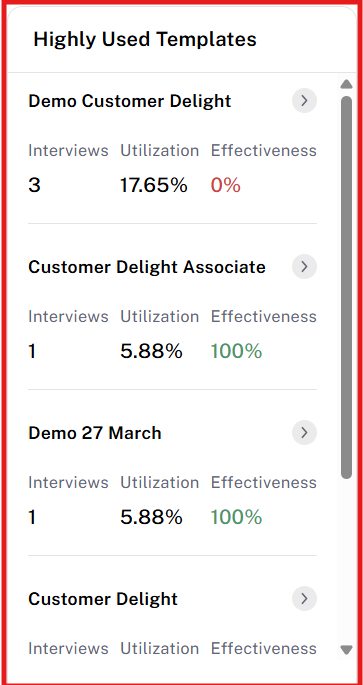
This section provides a quick overview of how interview templates are being used and their effectiveness.
- Template Usage: Shows how many times each template has been used in interviews.
- Template Utilization (%): Displays the percentage usage of each template compared to others.
- Template Effectiveness: Indicates how effective a template is based on the number of candidates marked as Highly Recommended or Recommended.
It helps in identifying the most popular and impactful templates for better interview outcomes.
Interview Schedule
The Calendar View provides a visual representation of scheduled interviews across different dates. It allows users to easily track and identify on which dates interviews are planned, helping in better scheduling and time management.
Related Articles
Session Overview
The Session Overview module provides a consolidated view of all completed interview sessions. It enables administrators to monitor assessment outcomes and review candidate performance in a structured and insightful manner. This section displays a ...Template Report
The Template Report module provides comprehensive insights into the performance and effectiveness of interview templates used within the Think Interview platform. It helps administrators evaluate how different templates contribute to candidate ...Interviewer Report
The Interviewer Report module provides a comprehensive analysis of interviewer performance and evaluation patterns. It helps administrators assess interviewer efficiency, consistency, and quality through AI-driven insights and performance metrics. ...How to create a new Session?
Creating a new interview session is a simple and structured process. Step 1: Initiate Session Creation Click on the “Create Session” button located on the right side of the page A new form will open where all required details must be filled Note: All ...Session
Session List The Session List displays all scheduled interview sessions in a structured format. From this section, administrators can view key details such as: Candidate name Interview status (e.g., scheduled, completed, no show) Interviewer ...