Session Overview
The Session Overview module provides a consolidated view of all completed interview sessions. It enables administrators to monitor assessment outcomes and review candidate performance in a structured and insightful manner.
This section displays a list of candidates who have successfully attempted their interview sessions, along with key performance indicators and evaluation details.
Within the Session Overview, administrators can access the following information:
- Candidate Interview Performance
- Interview Template Used
- Overall Candidate Score
- Final Recommendation/Suggestions by the Interviewer
- Date and Time of the Session
This helps in quickly assessing candidate outcomes without navigating into detailed reports.
Accessing Detailed Reports
For a deeper analysis:
- Click on the candidate’s name
-
A detailed report will be displayed
Candidate Information Includes:

- Personal Details
- Professional Details
- Session Details, such as:
- Job Role
- Group
- Interview Date and Duration
- Interviewer Name
Scoring Mechanism
Each candidate receives an overall score out of 100, which is a combination of:
1. AI Score
- Automatically generated by the system
- Evaluates candidates based on:
- Functional Skills
- Behavioral Competencies
2. Interviewer Score
- Provided manually by the interviewer
- Based on candidate performance during the interview
- Includes qualitative comments and feedback
Report Components
Summary and Stages
Provides an overview of the candidate’s journey and performance across different stages of the interview.
Core Competency Analysis
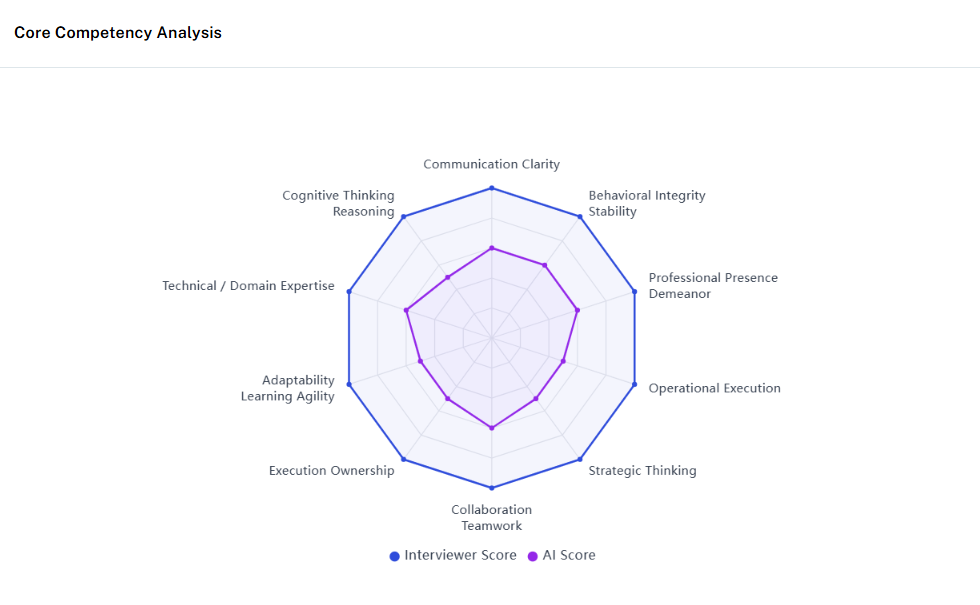
A graphical representation comparing:
- AI-generated scores
- Interviewer-provided scores
This helps in understanding consistency and evaluation alignment.
Speaking Time Analysis
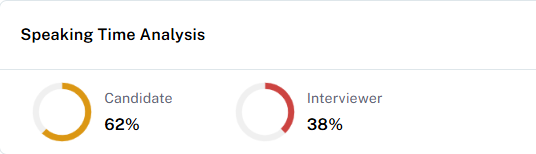
Displays the speaking duration of:
- The candidate
- The interviewer
This helps assess communication balance and candidate engagement.
Detailed Assessment
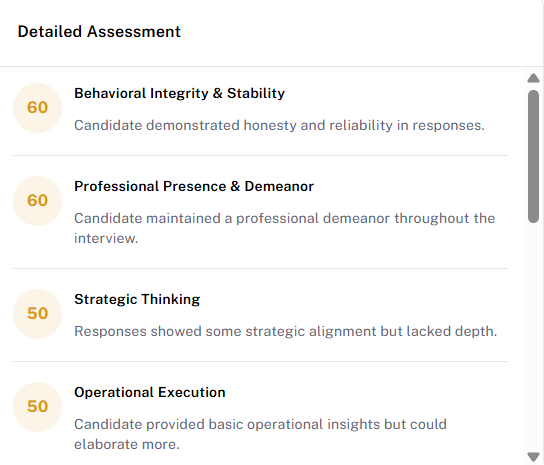
The AI system provides an in-depth evaluation of the candidate, including:
- Competency-wise scores
- AI-generated comments
Functional Skills Assessment
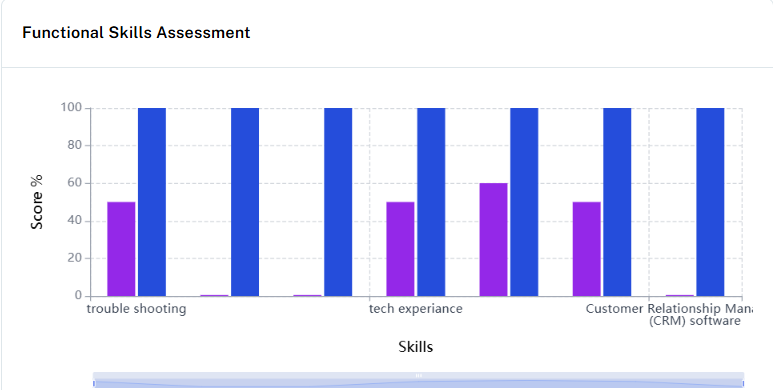
A graphical comparison of:
- AI evaluation
- Interviewer scoring
This highlights differences in perception and assessment.
Performance Summary
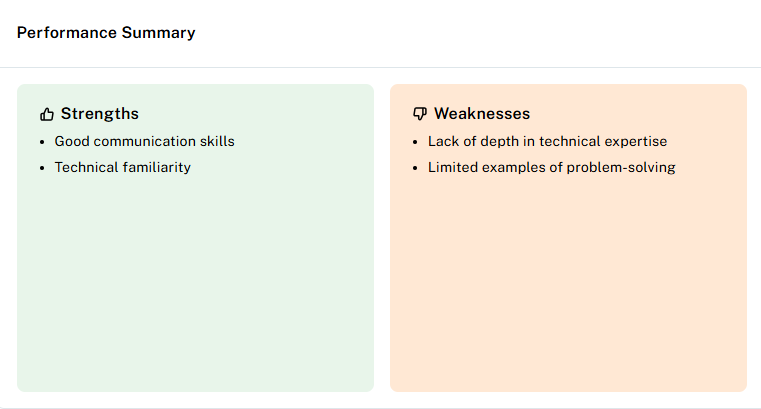
The AI system summarizes:
- Candidate strengths
- Areas of improvement
This provides a quick and actionable overview of candidate performance.
Characteristics Analysis
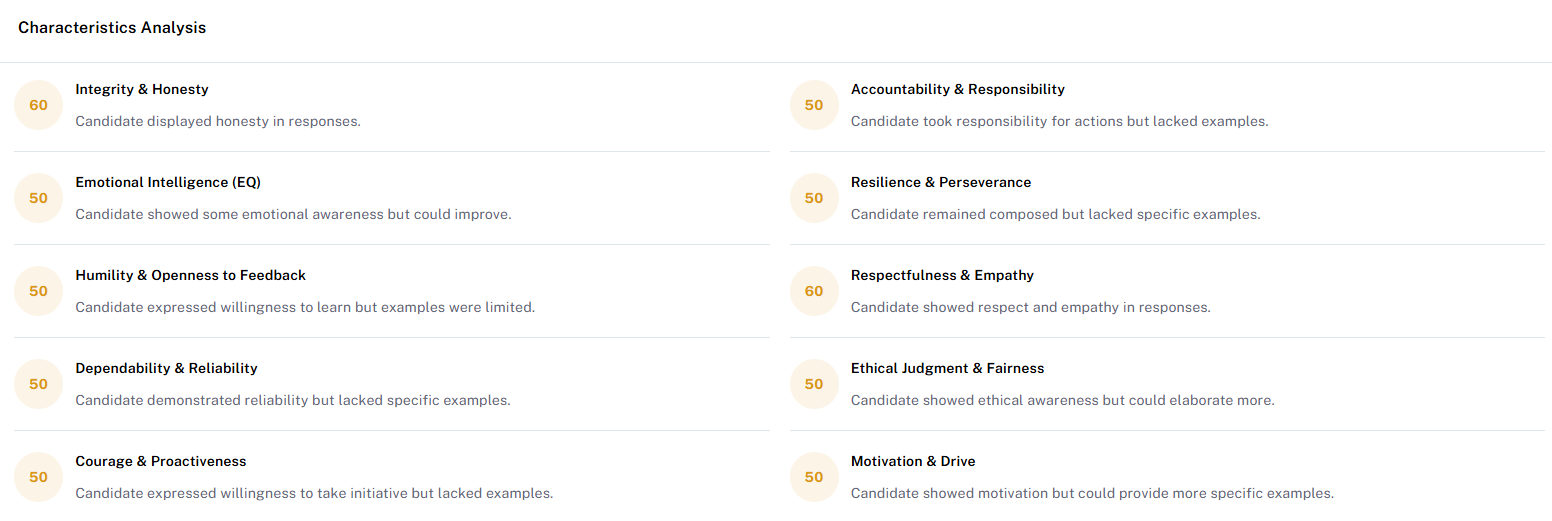
Based on the interview, the AI evaluates various characteristics and provides:
- Individual scores for each characteristic
-
AI-generated comments for deeper insights
Recording
The Recording section contains the video/audio recording of the completed interview session.
Purpose:
- Allows administrators, interviewers, and authorized users to review the complete interview.
- Helps in evaluating candidate performance and interview quality.
- Provides a reference for auditing and future assessment.
Details available:
- Complete interview video/audio recording.
- Session duration.
- Playback option to review candidate and interviewer interactions.
- Useful for quality checks and decision-making.
Transcript
The Transcript section provides the text conversion of the conversation that happened during the interview.
Purpose:
- Converts spoken communication into written text.
- Helps reviewers quickly read and analyze the interview without watching the entire recording.
- Makes it easier to evaluate answers and compare candidate responses.
Details available:
- Candidate’s spoken responses converted into text.
- Interviewer’s questions and statements.
- Conversation flow with timestamps (if enabled).
Messages
The Messages section displays the chat communication exchanged during the interview session.
Purpose:
- Shows text-based communication between participants.
- Helps track additional instructions, clarifications, or information shared through chat.
Details available:
- Messages sent by interviewer.
- Messages sent by candidate.
- Time and sequence of chat messages.
Related Articles
Think Interview – Dashboard Overview
The Think Interview Dashboard provides a comprehensive view of interview analytics and insights, enabling recruiters and administrators to monitor interview progress, evaluate candidate performance, and make informed hiring decisions. It offers ...Session
Session List The Session List displays all scheduled interview sessions in a structured format. From this section, administrators can view key details such as: Candidate name Interview status (e.g., scheduled, completed, no show) Interviewer ...Session List
Session List The Session List provides a structured view of all scheduled interview sessions. It allows administrators to easily track and manage interviews by displaying key details such as: Candidate Name Group & Role Interviewer (Panelist) Name ...How to create a new Session?
Creating a new interview session is a simple and structured process. Step 1: Initiate Session Creation Click on the “Create Session” button located on the right side of the page A new form will open where all required details must be filled Note: All ...Template Report
The Template Report module provides comprehensive insights into the performance and effectiveness of interview templates used within the Think Interview platform. It helps administrators evaluate how different templates contribute to candidate ...